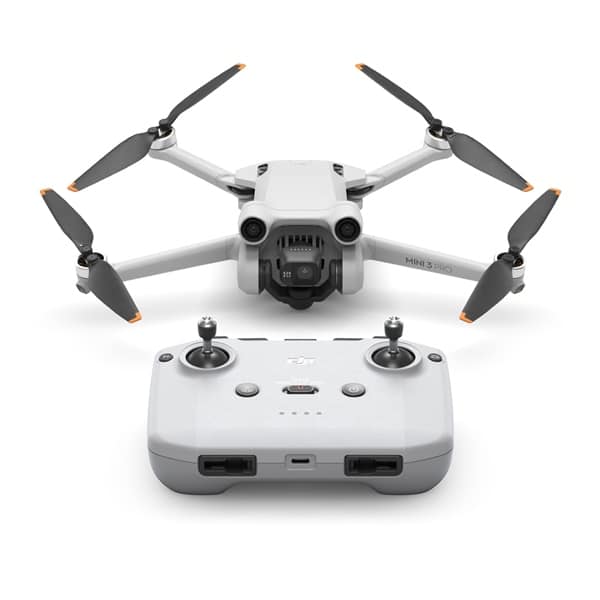
DJI Mini 3 Pro vs Mini 4 Pro is one of the most common comparisons for anyone shopping for a sub-250 g camera drone. On paper they look almost identical: same weight class, same size sensor, same folding design. Underneath, the Mini 4 Pro adds meaningful upgrades in safety and tracking, while the Mini 3 Pro still delivers excellent images for less.
This guide puts the DJI Mini 3 Pro vs Mini 4 Pro side by side across seven differences that actually matter, so you can decide which one fits the way you fly. One thing to know up front: Drones Direct stocks the DJI Mini 3 Pro but not the Mini 4 Pro. We compare both honestly, using DJI’s published specifications, so you can see whether the Mini 3 Pro covers what you need.
DJI Mini 3 Pro vs Mini 4 Pro at a glance
| Feature | DJI Mini 3 Pro | DJI Mini 4 Pro |
|---|---|---|
| Weight (standard battery) | Under 249 g | Under 249 g |
| Sensor | 1/1.3-inch, 48 MP | 1/1.3-inch, 48 MP |
| Max video | 4K/60fps | 4K/60fps HDR, plus 4K/100fps slow motion |
| Vertical shooting | True vertical | True vertical |
| Obstacle sensing | Tri-directional (forward, backward, downward) | Omnidirectional |
| Subject tracking | FocusTrack | ActiveTrack 360° |
| Rated flight time | Up to 34 min (47 min with Plus battery) | Up to 34 min (longer with Plus battery) |
| Available at Drones Direct | Yes | No |
Specifications are from DJI and measured in ideal conditions.
1. Camera and image quality
Both drones use a 1/1.3-inch 48 MP sensor, so in good light the difference in still images is small. That’s the headline of any DJI Mini 3 Pro vs Mini 4 Pro camera comparison: the Mini 3 Pro already has one of the best sensors in the sub-250 g class.
The Mini 4 Pro pulls ahead in video flexibility. It adds 4K at up to 100 fps for slow motion and more advanced colour options for editing. If you mostly shoot holiday clips, landscapes and social content at normal speed, the Mini 3 Pro’s 4K/60fps is plenty.
2. Obstacle sensing and safety
This is the biggest practical difference. The DJI Mini 3 Pro senses obstacles forward, backward and downward. The Mini 4 Pro adds omnidirectional sensing, so it can detect obstacles to the sides as well.
For beginners flying in tight, tree-lined spaces, or anyone using automated tracking, omnidirectional sensing is a real safety benefit. If you mostly fly in open spaces and fly forwards, the Mini 3 Pro’s sensors cover the most common crash risks.
3. Subject tracking
The Mini 4 Pro uses ActiveTrack 360°, which lets you follow a subject from almost any angle while the omnidirectional sensors watch for obstacles. The Mini 3 Pro offers FocusTrack modes that also follow subjects well, but with less freedom around obstacles.
If you plan to film yourself mountain biking, running or paddling, tracking is a strong reason to weigh the DJI Mini 3 Pro vs Mini 4 Pro carefully.
4. Transmission and range
The Mini 4 Pro uses DJI’s newer transmission system, which offers a stronger, more stable video link. The Mini 3 Pro’s system is still very capable for normal flying.
In Australia, you must keep the drone within visual line of sight, so headline range figures matter less than link stability. Both drones give a solid connection within the distances you’ll legally fly.
5. Flight time and batteries
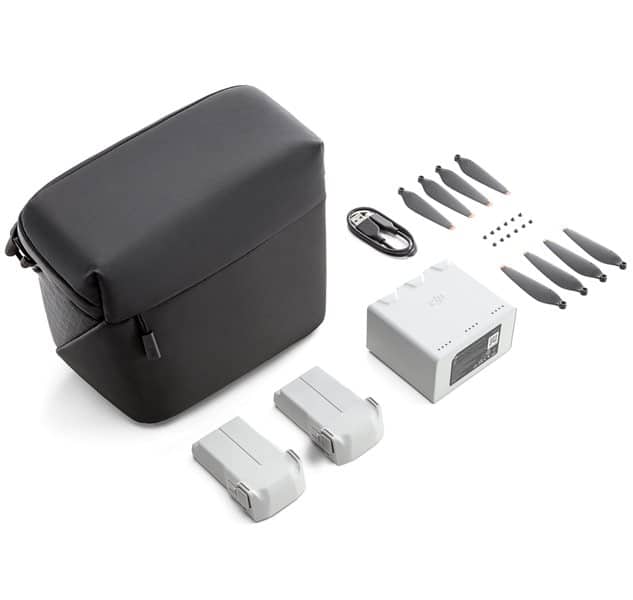
Both drones are rated for up to 34 minutes with the standard battery. The Mini 3 Pro listing notes up to 47 minutes with the larger Intelligent Flight Battery Plus, available in the Mini 3 Pro Fly More Kit Plus.
Note that Plus batteries take either drone over 250 g. That moves it out of the micro weight class, so it must follow the rules for heavier drones, such as staying 5.5 km from controlled aerodromes.
6. Smart features
The Mini 4 Pro adds extra automation, including waypoint missions, cruise control and improved return-to-home that plans a safer route. These features help with repeatable shots and longer, smoother passes.
The Mini 3 Pro includes popular automated shots and smart features such as QuickShots, MasterShots and Hyperlapse. For most people, those cover the creative essentials.
7. Price and value
The Mini 4 Pro is the newer model and typically costs more. The DJI Mini 3 Pro gives you the same sensor size, true vertical shooting and 34-minute flights for less, which makes it the value pick in the DJI Mini 3 Pro vs Mini 4 Pro debate for many buyers.
Design, build and controllers
From the outside, it’s hard to tell these drones apart. Both fold to a similar size, weigh under 249 g with the standard battery and use a gimbal that rotates 90 degrees for true vertical shooting.
The controller options differ. The Mini 3 Pro is offered with the RC-N1, which uses your phone as the screen, or the DJI RC with a built-in screen. The Mini 4 Pro pairs with the newer RC-N2 or DJI RC 2. A screen controller is convenient in bright sun and saves your phone battery, so it’s worth considering whichever drone you choose.
Wind performance
Wind is the biggest challenge for any sub-250 g drone, especially on the Australian coast. DJI rates both drones for similar maximum wind speeds, so neither has a major advantage in a stiff breeze.
In practice, both handle light to moderate wind well. On gusty days, fly lower, keep the drone closer and allow plenty of battery for the return trip. The Plus batteries add weight, which can help stability, but they take the drone over 250 g.
Real-world scenarios: which wins?
Specifications only tell part of the story. Here’s how the DJI Mini 3 Pro vs Mini 4 Pro comparison plays out in common situations.
| Scenario | Better pick | Why |
|---|---|---|
| Holiday and travel videos | Mini 3 Pro | Same sensor size and portability for less |
| Social media creators | Either | Both offer true vertical shooting |
| Filming yourself mountain biking or running | Mini 4 Pro | ActiveTrack 360° with omnidirectional sensing |
| Flying in forests or around buildings | Mini 4 Pro | Side obstacle sensing adds a safety margin |
| Landscapes and sunsets | Either | Both use a 1/1.3-inch sensor |
| Slow-motion action | Mini 4 Pro | 4K/100fps |
| Budget-conscious first drone | Mini 3 Pro | Strong features at a lower price |
Image quality in practice
In daylight, footage from both drones looks very similar, with sharp detail and pleasing colour. The 1/1.3-inch sensor handles high-contrast scenes such as sunsets and beaches better than the smaller sensors found on older mini drones.
Where the Mini 4 Pro pulls ahead is in post-production flexibility. Its extra video modes give editors more room to grade footage. For people who share clips straight to social media or edit lightly, the difference is hard to see.
Vertical shooting for social media
Both drones rotate their camera 90 degrees to shoot true vertical photos and video. That’s a big advantage over drones that crop a vertical frame out of a horizontal image, because you keep the full resolution.
If you create content for Reels, TikTok or Shorts, either drone delivers native vertical footage. On this point, the DJI Mini 3 Pro vs Mini 4 Pro comparison is a draw.
What to buy with your drone
Whichever model you choose, a few extras make a big difference.
- Extra batteries. One battery rarely covers a full outing. A Fly More kit adds batteries and a charging hub.
- ND filters. These help you achieve smooth, cinematic motion blur in bright Australian sun.
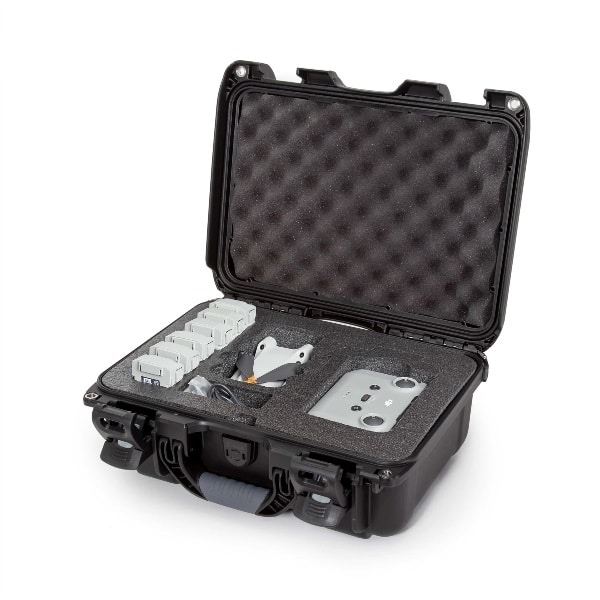
- A protective case. A fitted hard case protects the gimbal when travelling.
- A landing pad. It keeps sand, dust and grass away from the motors and camera.
- Spare propellers. Props chip easily, and damaged ones reduce performance.
Travelling with either drone
Both drones are ideal travel companions. They fold small enough for a daypack, and their light weight makes them easy to carry on long hikes.
- Carry batteries in your cabin bag. Airlines require spare lithium batteries in carry-on luggage, not checked bags.
- Check rules at your destination. Drone laws change between countries, states and parks.
- Pack a hard case. It protects the gimbal from bumps in transit.
- Download offline maps. Remote spots may lack mobile coverage.
- Bring a charging hub. Charging several batteries overnight from one outlet saves time.
National parks across Australia often restrict drones, so always check park rules before you fly.
Warranty, care and support
Buying from an established retailer protects you if something goes wrong. Genuine stock comes with the manufacturer’s warranty and the support you expect.
Look after your drone and it will look after you. Keep firmware updated, inspect propellers before each flight, store batteries at around half charge when not in use, and wipe off sand and salt after coastal flights.
Should you buy an older model?
Choosing the Mini 3 Pro over the newer Mini 4 Pro is a smart way to save money. Older flagship drones still receive app support and deliver excellent results. The key is to buy from a reputable retailer, so you get genuine stock, a valid warranty and support.
Our drone buying checklist explains what to check before you pay, including warranty, grey imports and what’s included in the box.
Who should choose the DJI Mini 3 Pro?
Choose the DJI Mini 3 Pro if you:
- Want flagship sub-250 g image quality without paying for the newest model.
- Mostly fly in open spaces like beaches, parks and countryside.
- Shoot social content and want true vertical video.
- Prefer to spend the savings on extra batteries, a case or ND filters.
Who should choose the DJI Mini 4 Pro?
The Mini 4 Pro may suit you better if you:
- Fly close to trees, buildings or cliffs and want omnidirectional sensing.
- Rely heavily on subject tracking for action footage.
- Need 4K/100fps slow motion or advanced colour workflows.
- Want waypoint missions for repeatable shots.
Pros and cons
DJI Mini 3 Pro
Pros
- 1/1.3-inch sensor with excellent image quality for the size
- True vertical shooting for social media
- Tri-directional obstacle sensing
- Up to 34 minutes standard, or 47 minutes with the Plus battery
- Lower price than the Mini 4 Pro
- Available from the Drones Direct range
Cons
- No side obstacle sensing
- Fewer advanced video modes
- Older transmission system
DJI Mini 4 Pro
Pros
- Omnidirectional obstacle sensing
- ActiveTrack 360° for flexible subject tracking
- 4K/100fps slow motion and extra colour options
- Waypoints, cruise control and improved return-to-home
Cons
- Costs more
- Image quality in good light is similar to the Mini 3 Pro
- Not stocked by Drones Direct
Getting the best from the Mini 3 Pro
If you choose the DJI Mini 3 Pro, these settings and habits help you match more expensive drones.
- Shoot in 4K at 24, 25 or 30 fps for the best balance of quality and file size.
- Use D-Cinelike if you edit and colour grade, or the normal profile for ready-to-share footage.
- Fit ND filters in bright sun so your shutter speed stays close to double the frame rate.
- Turn on obstacle avoidance and set the return-to-home height above the tallest nearby trees.
- Fly forwards where possible, since there are no side sensors.
- Use the Plus battery thoughtfully. It extends flight time but moves the drone out of the sub-250 g class.
Alternatives in the Drones Direct range
If the DJI Mini 3 Pro vs Mini 4 Pro decision leaves you wanting something different, these drones in our range are worth comparing.
| Drone | Why consider it |
|---|---|
| DJI Mini 3 Pro | Same sensor size as the Mini 4 Pro, true vertical shooting |
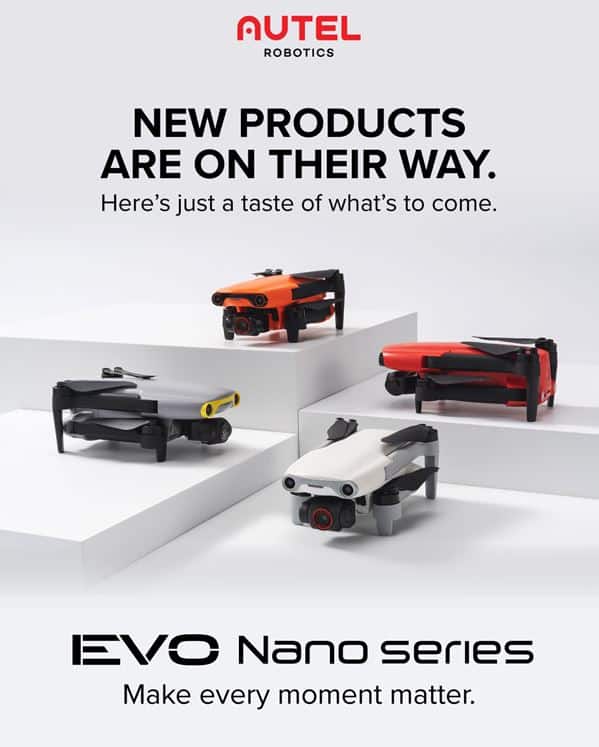
| Autel EVO Nano Plus | Sub-250 g with a large 1/1.28-inch sensor and three-way obstacle avoidance |
| DJI Mini 2 Fly More Combo | Lower-cost 4K drone with three batteries |
| DJI Air 2S | 1-inch sensor if you don’t need the sub-250 g class |
For a deeper look at the Mini 4 Pro on its own, read our DJI Mini 4 Pro guide. Our mini drone guide also compares every sub-250 g option we stock.
Flying either drone in Australia
Whichever side of the DJI Mini 3 Pro vs Mini 4 Pro comparison you land on, CASA’s standard operating conditions apply.
- Fly at or below 120 m above ground level.
- Keep the drone within visual line of sight.
- Stay 30 m from people and don’t fly over them.
- Fly during the day only.
- Avoid emergency operations and populous areas.
At under 250 g with the standard battery, both drones are micro drones. Check CASA’s drone rules for the latest requirements.
Accessories for the Mini 3 Pro
Get more from the DJI Mini 3 Pro with the Mini 3 Pro Fly More Kit for extra batteries and charging, and protect it with the Nanuk 915 case for DJI Mini 3 Pro.
DJI Mini 3 Pro vs Mini 4 Pro FAQ
Is the Mini 4 Pro worth the upgrade over the Mini 3 Pro?
If you need omnidirectional obstacle sensing, ActiveTrack 360° or 4K/100fps, yes. If you mainly want excellent images in a sub-250 g drone, the Mini 3 Pro remains a strong, better-value choice.
Do the Mini 3 Pro and Mini 4 Pro have the same camera?
They use the same size sensor, a 1/1.3-inch 48 MP chip. The Mini 4 Pro adds extra video modes such as 4K/100fps slow motion.
Which is better for beginners?
The Mini 4 Pro’s omnidirectional sensing makes it more forgiving. However, the Mini 3 Pro’s tri-directional sensing still covers the most common beginner mistakes, and it costs less. Our guide to the best drone for beginners explains more.
Do I need to register either drone?
Not for recreational flying in Australia. If you fly either drone for business, registration and operator accreditation are required.
Does Drones Direct sell the Mini 4 Pro?
No. We stock the DJI Mini 3 Pro and a range of other camera drones you can compare in our camera drones range.
Which has better battery life, the Mini 3 Pro or Mini 4 Pro?
They are rated the same with the standard battery, at up to 34 minutes. Both offer larger Plus batteries for longer flights, which push the drone over 250 g.
Can the Mini 3 Pro shoot vertical video?
Yes. The gimbal rotates 90 degrees for true vertical photos and video, just like the Mini 4 Pro.
Is the DJI Mini 3 Pro still a good drone to buy?
Yes. With a 1/1.3-inch sensor, true vertical shooting, tri-directional obstacle sensing and up to 34 minutes of flight, the Mini 3 Pro remains one of the most capable sub-250 g drones, and it often costs less than newer models.
The verdict: DJI Mini 3 Pro vs Mini 4 Pro
In the DJI Mini 3 Pro vs Mini 4 Pro match-up, the Mini 4 Pro wins on safety, tracking and video modes, while the Mini 3 Pro wins on value with the same size sensor and true vertical shooting. If you fly mostly in open spaces and want great images for less, the Mini 3 Pro is the smart choice.
Browse the DJI Mini 3 Pro, compare our full camera drones range, or visit the drone shop.